

The Answer is Yes, you can activate a Japan eSIM outside of Japan. The activation process works globally as long as your device supports eSIM and you have a stable internet connection. Now, let’s walk through how to activate your Japan eSIM from the comfort of your home. This guide covers both iPhone and Android, providing a clear, step-by-step process for either device.
Before You Get Started
| Key Factor | Requirement |
|---|---|
| eSIM Compatibility | eSIM-compatible iPhone(XS/XR or newer versions) or Android device. |
| Internet Connection | Stable Wi-Fi or cellular data is required for eSIM installation. |
| Activation Method | QR code scan or manual activation |
| eSIM Coverage | Within Japan only |
1. Check Device Compatibility
To use eSIM, your device must support eSIM technology. Most modern smartphones that were released after 2018 have this feature. However, phones that are manufactured exclusively for markets like China, Hong Kong, and Macau often don’t support eSIM.
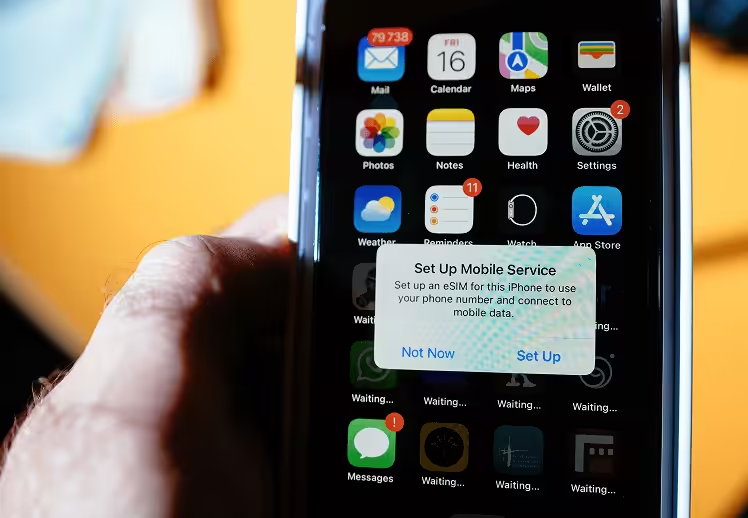
- iPhone Compatibility:
- iPhone XS, XS Max, XR (2018) and newer models.
- iPad Pro (2018) and newer tablet models.
- For optimal performance, the latest IOS version is recommended.
- Android Compatibility:
- Google Pixel 3 and newer models.
- Samsung Galaxy S20 series and newer.
- Check manufacturer specifications for eSIM support.
You can also check your device’s IMEI (International Mobile Equipment Identity) to check if your phone supports eSIM. If your device has an IMEI, it supports eSIM. Simply dial *#06# or check your phone’s settings to find your IMEI.
2. Reliable Internet Connection
Your device must be connected to a reliable internet connection to download and install the eSIM profile. The installation process may fail, or the eSIM may not be activated correctly without a stable internet connection.
Preferred Connections
- Wi-Fi: The use of private, secure Wi-Fi networks at home or in hotels is recommended. The use of public Wi-Fi networks, such as those available in airports or cafes, is not advised due to security risks and unstable connections.
- Mobile Data: Using existing mobile phone data is suggested when no Wi-Fi is available. Just make sure you have sufficient data or roaming enabled for the installation process.
Tips for successful installation:
- Avoid a weak or unstable network, as interruptions can result in activation failure.
- Before installation, make sure to turn off VPNs or proxy connections.
- If you must use public Wi-Fi, choose the one with a strong signal strength and avoid those that require frequent logins or have restrictive firewalls.
- To ensure a successful connection, your device requires a strong, uninterrupted internet connection to communicate with your eSIM carrier’s server.
3. Setup Requirements
For a successful manual installation, you’ll need key information from your carrier. The SM-DP+ Address (Subscription Manager Data Preparation Address) serves as the secure connection identifier between your device and the eSIM server. Your carrier provides this information at the time of purchase. You will also need an activation code, which is a unique identifier that links your device to your specific eSIM plan. At the time of your purchase, ESIMJAPAN.com will send you an email within 10 minutes of payment, which includes a QR code, SM-DP+ Address, and activation code.
4. When to activate your eSIM
Option 1. Activation before Departure (Outside of Japan)
- If your plan activates upon arrival at your destination, you can safely set up your eSIM before traveling.
- Activating your eSIM with your home internet connection is more reliable than using public networks while traveling.
Option 2. Activation upon arrival (In Japan)
- If your eSIM plan starts immediately upon activation, it is best to activate your eSIM at your destination to avoid using data while still at home.
- For activating your eSIM upon arrival, ensure your device is connected to a stable internet connection.
How to install your eSIM
1. iPhone eSIM Activation
Set up process:
- Open [Settings] from the home screen
- Tap [Cellular] (or [Mobile Data] in some regions)
- Select [Add Cellular Plan] or [Add eSIM]
- Choose [Use QR code]
QR code method:
- Choose the [Scan QR Code] option
- Position your camera to scan the QR code provided
- Download the eSIM profile
- Follow the on-screen prompts to complete the installation and activation process
Manual setup process:
- Tap [Enter Details Manually]
- Input SM-DP+ Address
- Enter the activation code provided by your carrier
- Confirm the plan details and proceed with installation
Final configuration:
- Label your new eSIM as “Japan Trip 2025” for your convenience
- Select primary or secondary line designation
- Configure your data usage preferences
2. Android eSIM Activation
Set up process:
- Open [Settings] from the app drawer
- Navigate to [Connections]
- Select [SIM Card Manager]
- Tap + button or [Add eSIM] (or [Mobile Plan] in some regions)
eSIM Installation:
- Choose [Scan QR code] when prompted
- [Scan QR code] or choose [Enter Activation Code]
- Follow the on-screen prompts to complete the installation and activation process
- Label your new eSIM as “Japan Trip 2025” for your convenience
Need more help setting up? Check out our complete installation guides for iOS and Android.
Troubleshooting Common eSIM Activation Issues
1. eSIM Activation Problems
Internet Connection Issues: Ensure you have a stable Wi-Fi or cellular connection during the eSIM download process. Weak signals can cause installation failures or incomplete downloads.
Invalid Code Errors:
- If QR code scanning fails, try entering the activation code manually instead.
- If the error persists, check for the following details:
- Verify that your SM-DP+ address and activation code are correct
- Make sure no “https://” or “http://” prefix is included in the SM-DP+ Address
- Check if the eSIM profile is already installed on your device
- Contact customer care if you cannot resolve the issue.
2. Internet Connection Issues
If you experience connectivity issues after activation, follow these steps:
- Set your travel eSIM as the primary data line in Cellular Settings
- Enable data roaming for your eSIM – Most eSIM plans require this setting to be active
- If your eSIM is reinstallable, delete and reinstall the eSIM profile
- If problems persist, contact your carrier’s customer support
Travel Connectivity Checklist
1. Before Your Trip
Device Preparation:
□ Check that your device is eSIM-compatible.
□ Install the latest software updates on your device.
Plan your Purchase and Setup:
□ Buy your Japan travel eSIM.
□ Download eSIM using a reliable internet connection.
□ Check eSIM installation in device settings.
2. Upon Arrival
Service Activation:
□ Turn off airplane mode when ready to activate service.
□ Set travel eSIM as the primary data in cellular settings.
□ Test internet connectivity.
Backup Preparations:
□ Locate nearby Wi-Fi networks to reduce data usage.
□ Install offline maps and language translation tools.
□ Store customer service contact details for easy access.
Experience Seamless Japan Travel Connectivity
Getting your Japan eSIM working from anywhere in the world is not that complicated with the right approach. As long as your device supports eSIM and has good internet, you can get everything ready before your trip or once you land – whatever suits your plan best.
ESIMJAPAN.com takes the hassle out of travel connectivity with budget-friendly options from just $4.99, including unlimited Japan data plus global multi-country plans. Our dedicated support team is available around the clock, ready to assist you anytime, anywhere in the world.
Ready to stay connected throughout your Japan adventure? Order your eSIM today and follow our step-by-step setup guide with complete confidence. Need quick help? Contact our 24/7 support at [email protected] – we’ll get back to you in under 10 minutes.


Leave a Reply